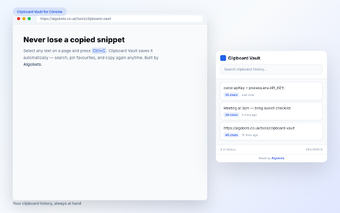
Clipboard Vault: Local clipboard history for heavy copy-paste workflows
Clipboard Vault, developed by Algobots, is a Chrome extension that preserves multiple copied snippets so users do not lose text when the clipboard is overwritten. It captures copied text in the background and provides quick retrieval tools plus manual save options for targeted captures. The extension stores data locally with configurable history limits and optional desktop notifications, targeting developers, writers, researchers and power users who manage frequent copy-paste tasks.
How does the extension protect clipboard data on your device?
The extension uses Chrome's storage API to keep all snippets on the local machine and does not perform cloud synchronization or transmit data to external servers. That local-only model removes account setup and server-side storage from the workflow, and notifications are optional so users control when saves are surfaced. Data management is therefore handled under the browser's storage controls rather than through a remote service.
Does the extension add noticeable load to the browser?
The codebase is approximately 21 KiB, giving the extension a very small install footprint compared with many browser add-ons. It captures text snippets in the background without running complex background processes, so visible CPU work during normal browsing is unlikely. Any memory or process impact follows the host browser's multi-process behavior rather than the extension's binary size alone.
Is it convenient for heavy copy-paste workflows and portability?
The extension offers a keyboard shortcut (Ctrl+Shift+V on Windows/Linux, Cmd+Shift+V on macOS) for fast access and supports manual portability through JSON export/import. Users can choose history limits of 10, 25, 50 or 100 items and pin frequently used snippets to keep them available. Theme options (light, dark, system) adapt the UI to the browser appearance and a right-click save integrates with normal page workflows.
This extension fits users who prefer local control and small footprints
It is a suitable choice for people who want a privacy-centered, compact clipboard history without account-based services. Users who require automatic, cross-device synchronization will find the local-only design restrictive, since transfers rely on manual export. For those willing to trade automated sync for on-device control, the extension provides a minimal, focused clipboard history that integrates into a browser-centered workflow.